For iPhone · iPad · Mac · Android


A to-do list that survives a real week.

Capture what's on your mind, decide what it's actually worth, and let Diluta surface the right thing at the right time. When your day gets rewritten — and it will — it keeps up. No setup ritual. No guilt.

As seen on Yahoo Finance On the App Store & Google Play
Reminder set — 4:15 PM Goal on pace · 68%
TodayTuesday
Live
Morning standup
9:00 AM
Ship the client deck
11:00 AM
Must
Deep work — Q3 plan
2:00 PM
Home with Leo
2:00 PM · today
School pickup
4:30 PM
Leo's home sick — the afternoon just moved.
Your day turned left. Diluta kept up — nothing dropped, nothing red.
As featured in
Yahoo!finance GlobeNewswire Product Hunt Benzinga Business Insider
Built for the rest of us

Most apps are built for a week that goes to plan.
Yours doesn't.

A meeting moves. A kid gets sick. A deadline lands early. You don't need another rigid system to fall behind on — you need one that keeps up with what actually happened, and quietly points you at the next right thing.

The solo operator

Three clients, one inbox, no ops team

The invoice, the follow-up, and the deadline that moved all live in one place. When a client call runs long, the afternoon re-sorts itself — and nothing leaks through the cracks.

The parent

School pickup vs. the 4 o'clock call

When the school nurse calls at 1:40, the plan bends instead of breaking. Deep work slides to tomorrow, pickup moves up, and dinner still happens. No red badges. No guilt.

The student

A midterm, a shift, and a paper — same week

Energy tags match the reading to the tired hours and the problem sets to the sharp ones. The week fits the brain you actually have, not the one the syllabus assumed.

Take it for a spin

From a passing thought to done — in a few taps.

Here's the whole loop. Watch a stray idea become a scheduled, prioritized task that shows up exactly when it should.

Capture

Say it to Siri, Gemini or just type it.

The thought that shows up while you're driving, cooking, or mid-meeting doesn't need a form. Add it by voice, from the share sheet, a widget, or the app — it lands in your Inbox, out of your head, so you can get back to what you were doing.

“Hey Siri or Gemini, add pick up the prescription to Diluta.”
Saved to your Inbox
Triage

Do it now, schedule it, or let it wait — on purpose.

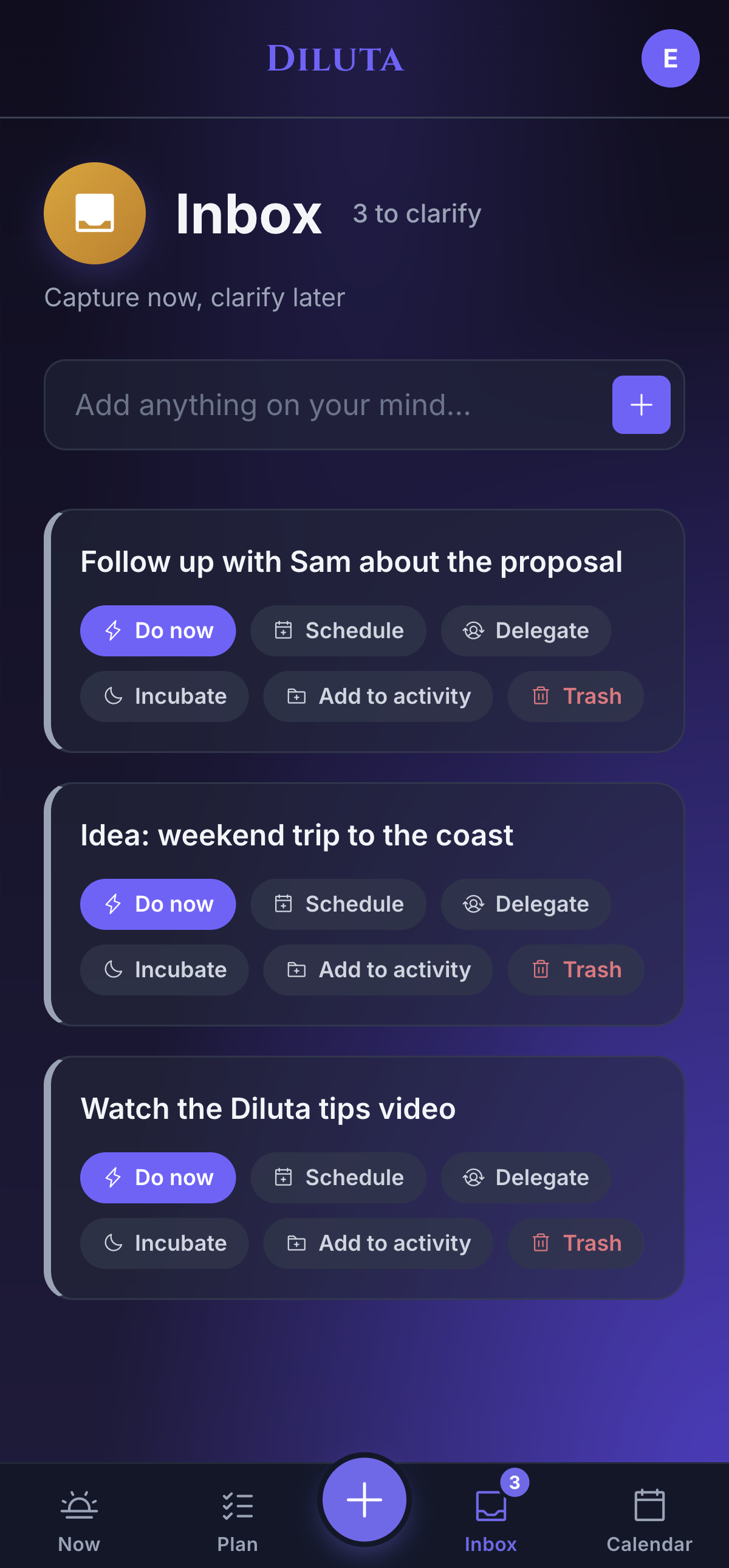
Your Inbox is a staging area, not a guilt pile. Clear it in seconds: do it now, schedule it, delegate it, or let it incubate. The things that matter get a time; the small stuff goes to later, deliberately.

Diluta Inbox with triage actions
Decide

Give it the context that tells you what it's worth.

This is the part other to-do apps skip. Tie a task to an Activity and a Goal, tag the Energy it needs, set an A–E priority, even score it with RICE. Now the app knows what actually matters — so you don't have to re-decide every morning.

Ship the client deck
Due Tue · 11:00 AM
ActivityPlan & Reflect
GoalShip the side project
EnergyHigh
PriorityA · Must do
RICE score42
See it

See the over-booked day before it blows up.

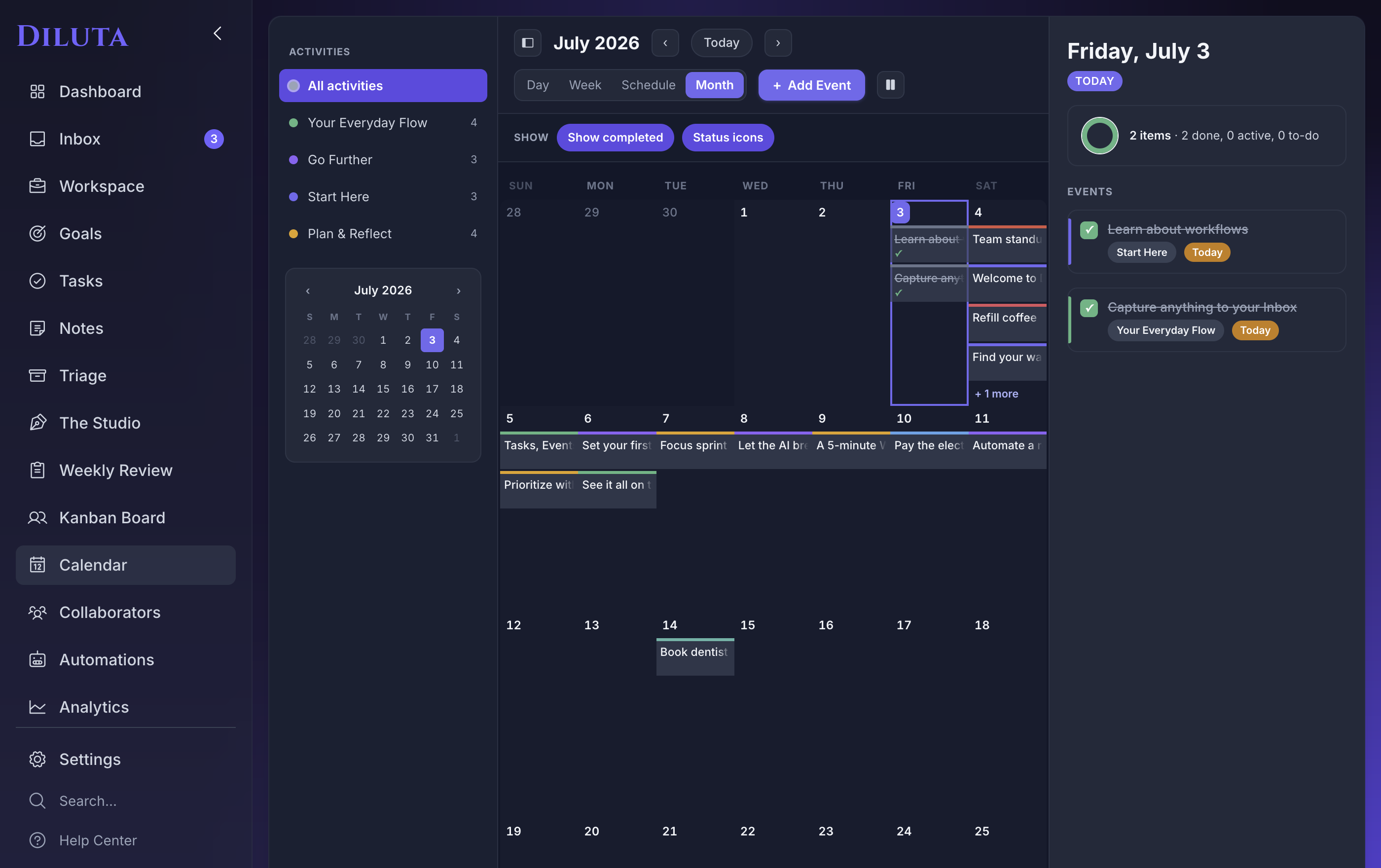
Month, week, day, and schedule views put your Diluta tasks right next to your actual Apple Calendar events — the meeting, the school pickup, and the deadline on one honest timeline. A packed day shows itself early, while there's still time to move something.

Diluta — Calendar
Diluta calendar with tasks and Apple events
Work it

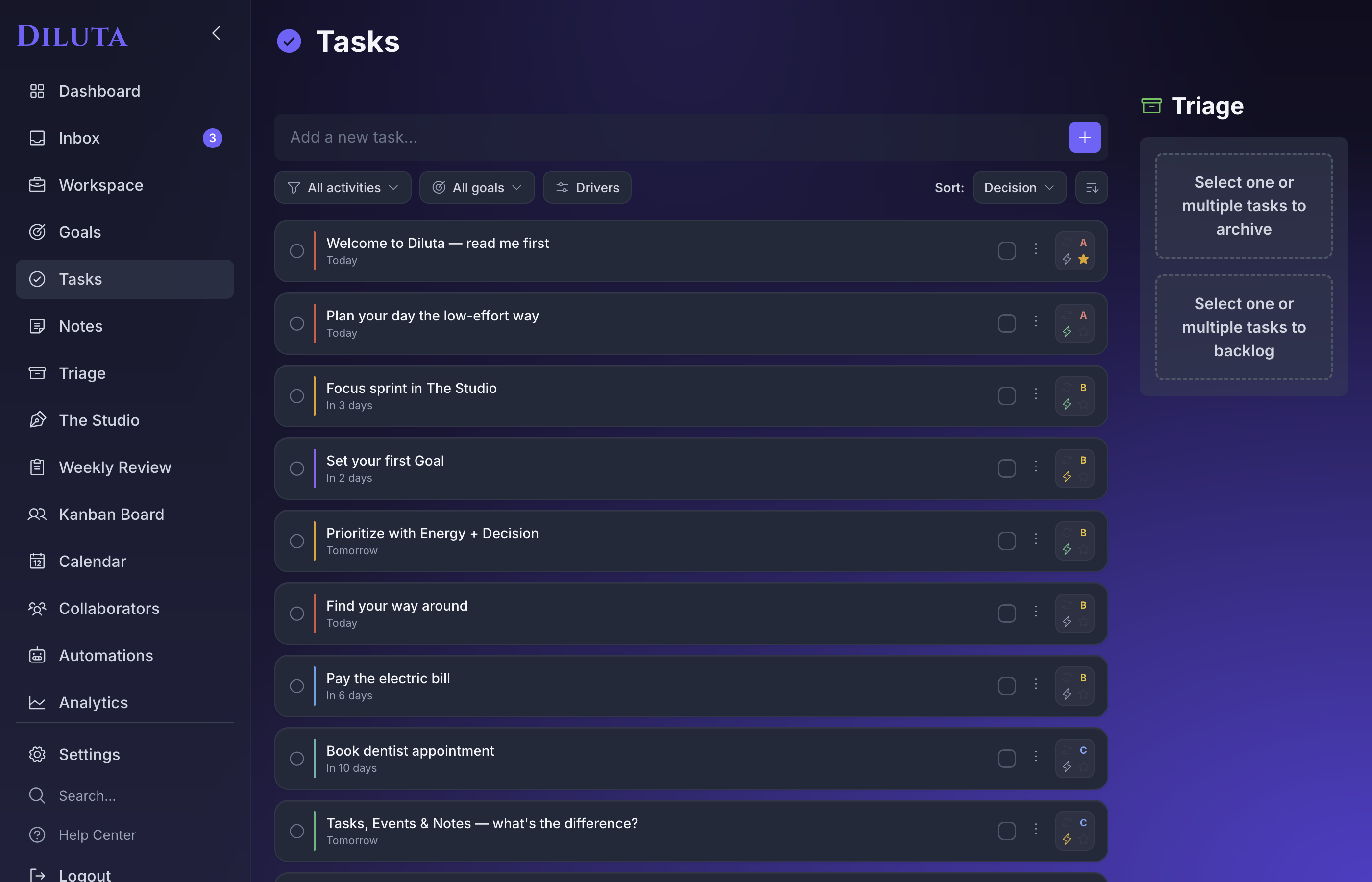
Filter to what matters now. Sort. Go.

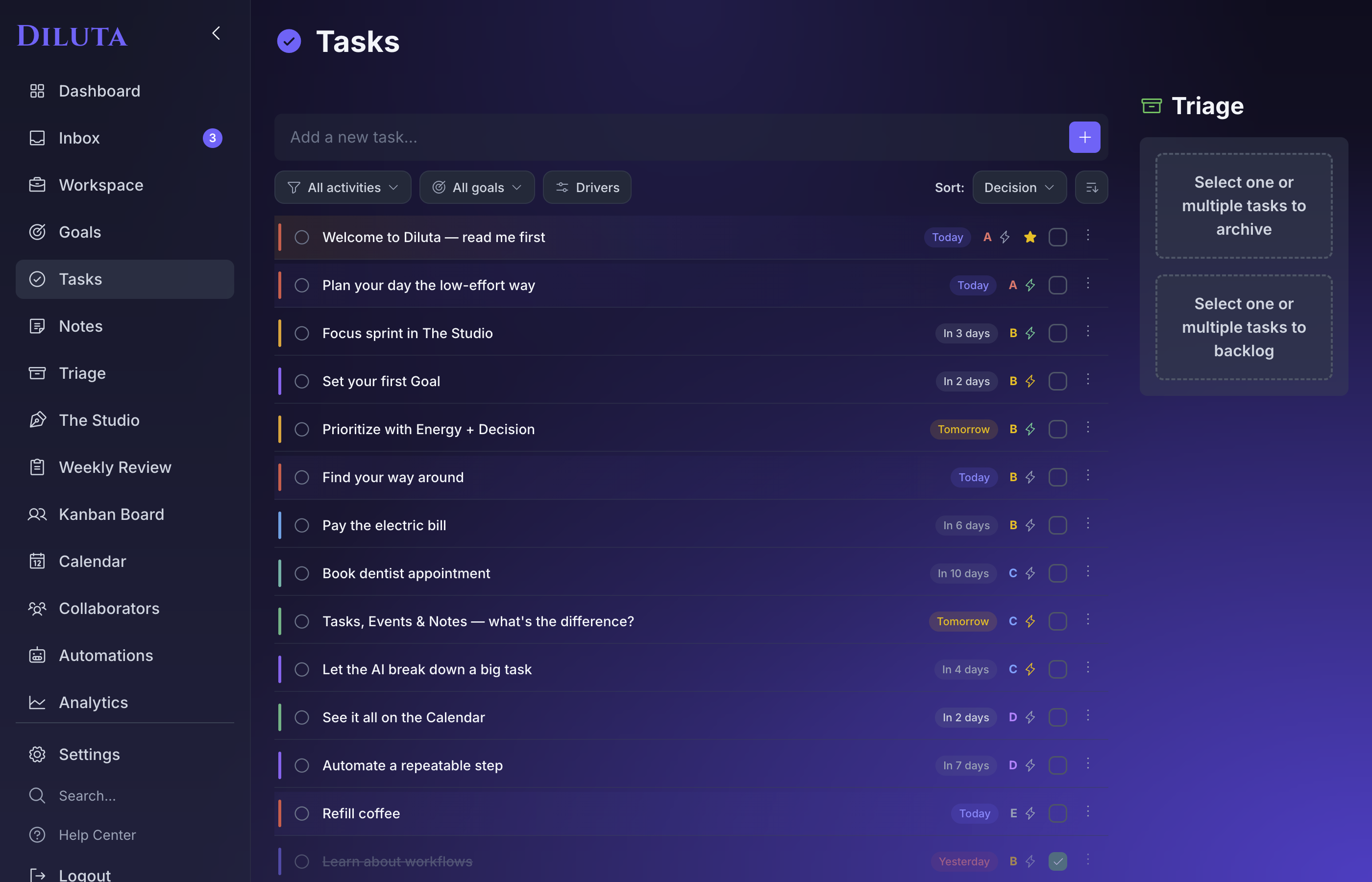
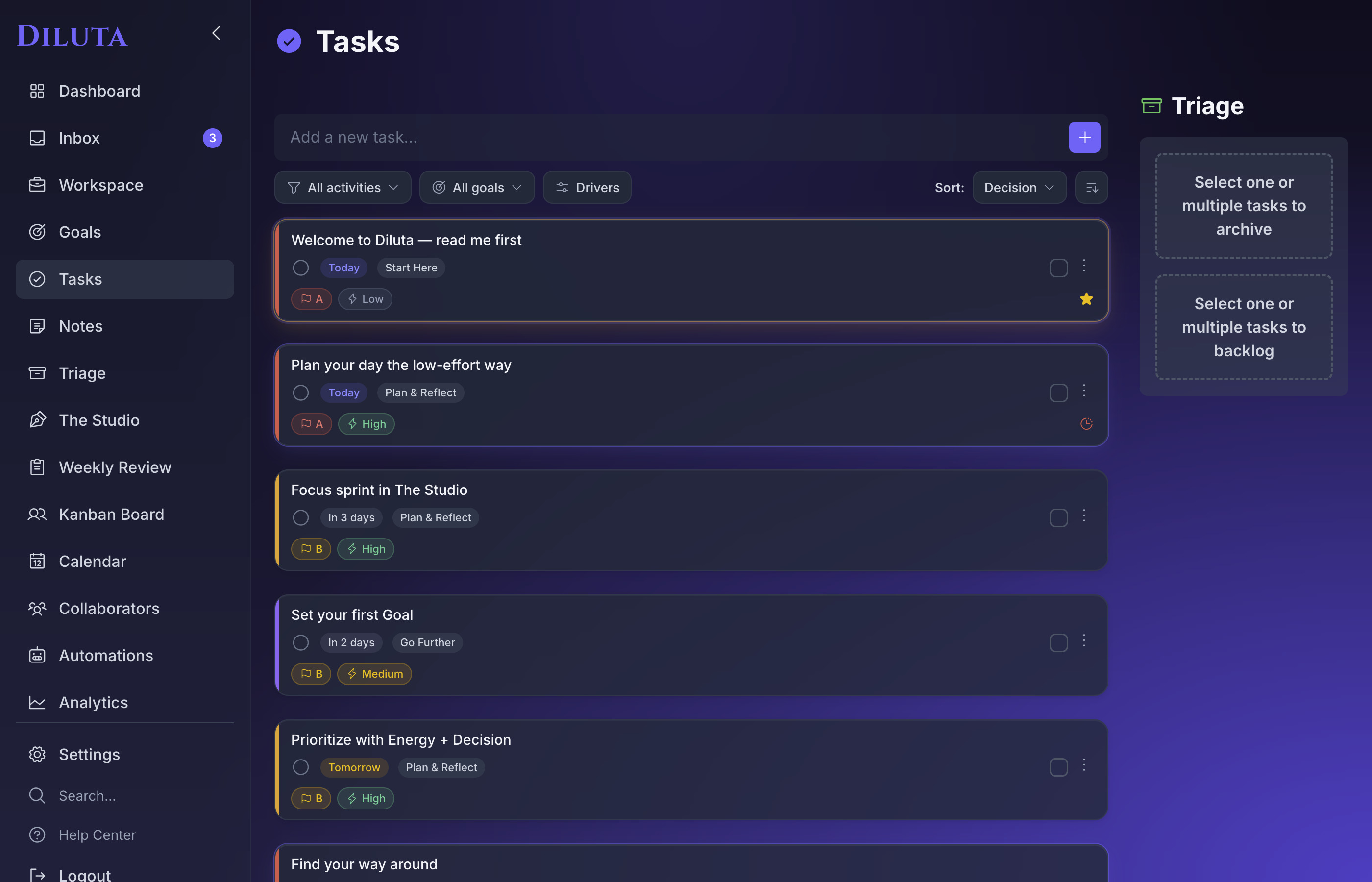
In Plan, narrow by activity, goal, or driver, then sort by what you decided — priority, energy, RICE, or due date. The right task rises to the top, and the noise steps back. Simplify instead of drown.

Diluta — Plan
Diluta Plan view with activity, goal and driver filters
1 / 5
The part other apps don't have

A to-do list that helps you decide, not just remember.

A longer list never made anyone calmer. Diluta gives every task the context that answers the only question that matters — what should I do next?

Activity

Group tasks under the projects and parts of your life they belong to.

Goal

Ladder today's tasks up to what you're actually trying to reach.

Energy

Tag low / medium / high, and match work to the brain you've got right now.

A–E priority

Must-do, should-do, nice-to-do, delegate, or eliminate. Decide once.

RICE score

Reach × Impact × Confidence ÷ Effort — when you want the math to break a tie.

Then the Drivers filter and a weekly Review surface exactly what deserves you right now — so the system does the sorting, and you just do the work.

Checking the day from the beach, unbothered
The point of all this

The list isn't the point.
Your life is.

Diluta exists so you can check once, get your answers, and put your device down. Less time managing the week — more time getting things done.

The part that works for you

It doesn't just hold your list.
It tells you what to do with it.

Most apps stop at storage — they remember your tasks and hand them back, unsorted, for you to figure out. Diluta reads the pile the way a good manager would — your deadlines, your energy, the calls you've already made — and surfaces what actually needs you. The pass you'd make by hand on a Sunday night, done for you, every time you open it.

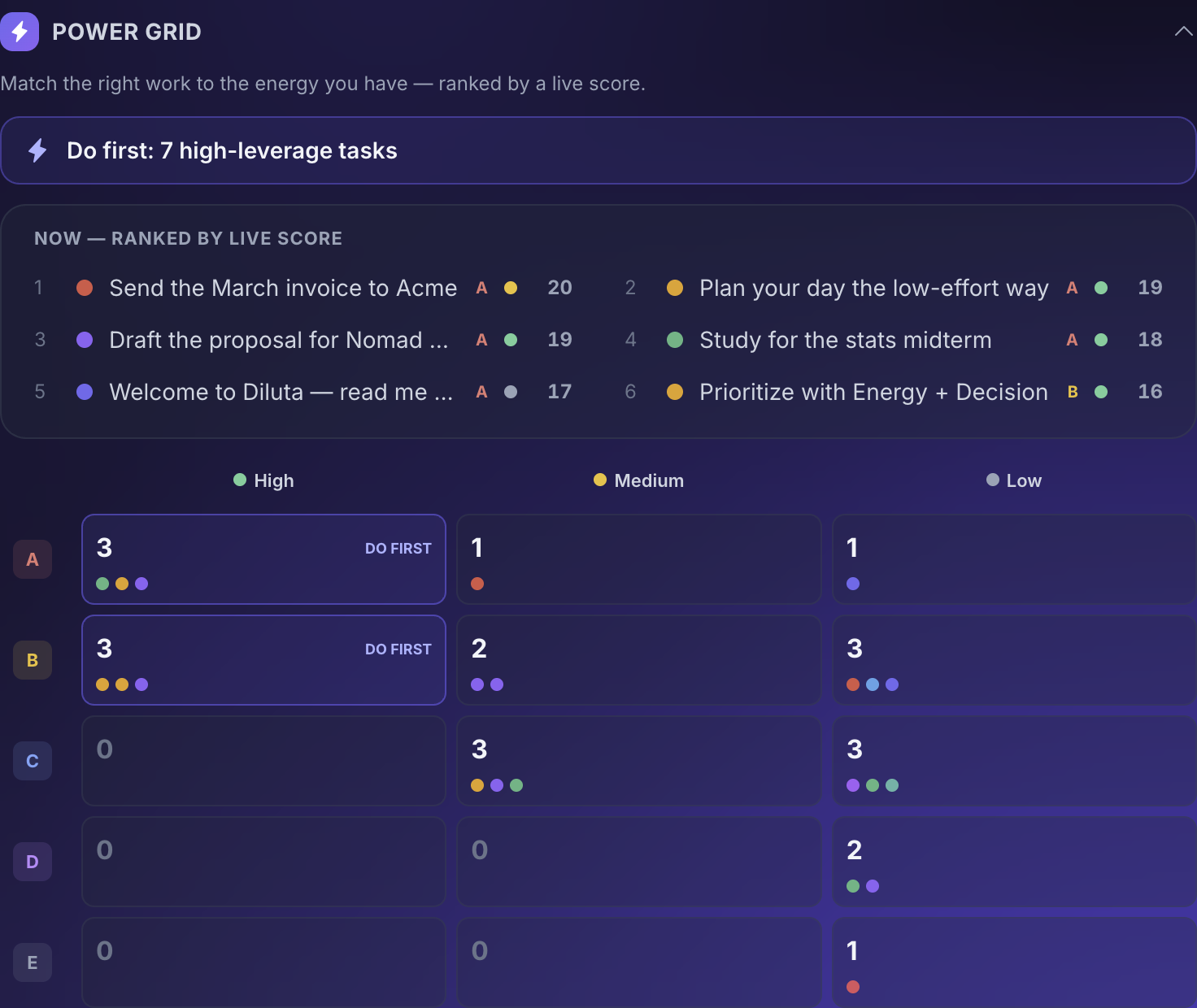
Diluta — The Power Grid, decision × energy with a live-score ranking

The Power Grid

Your work mapped by decision and energy, so the hard stuff lands in the hours you can actually do it. A calmer Eisenhower that re-ranks itself as the day moves.

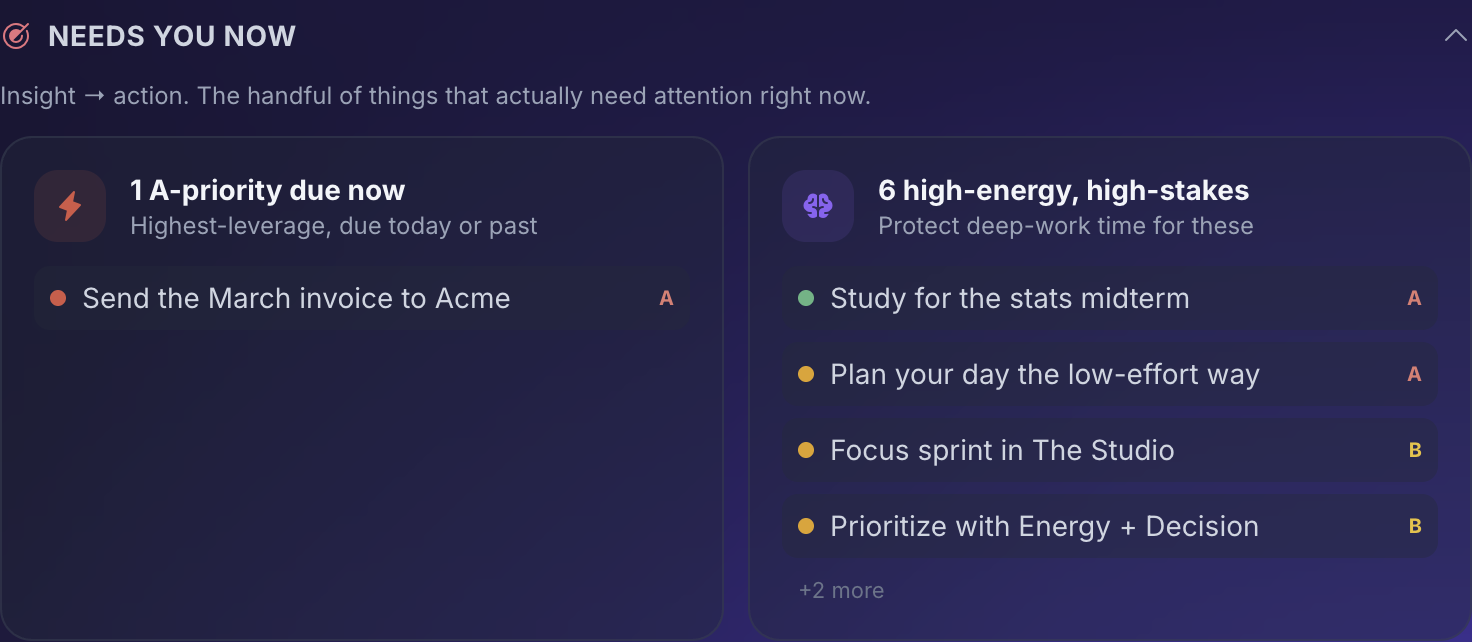
Diluta — Needs You Now attention triage

Needs You Now

The handful that genuinely need you today — overdue, high-stakes, or quietly stalling — pulled to the top before you go looking.

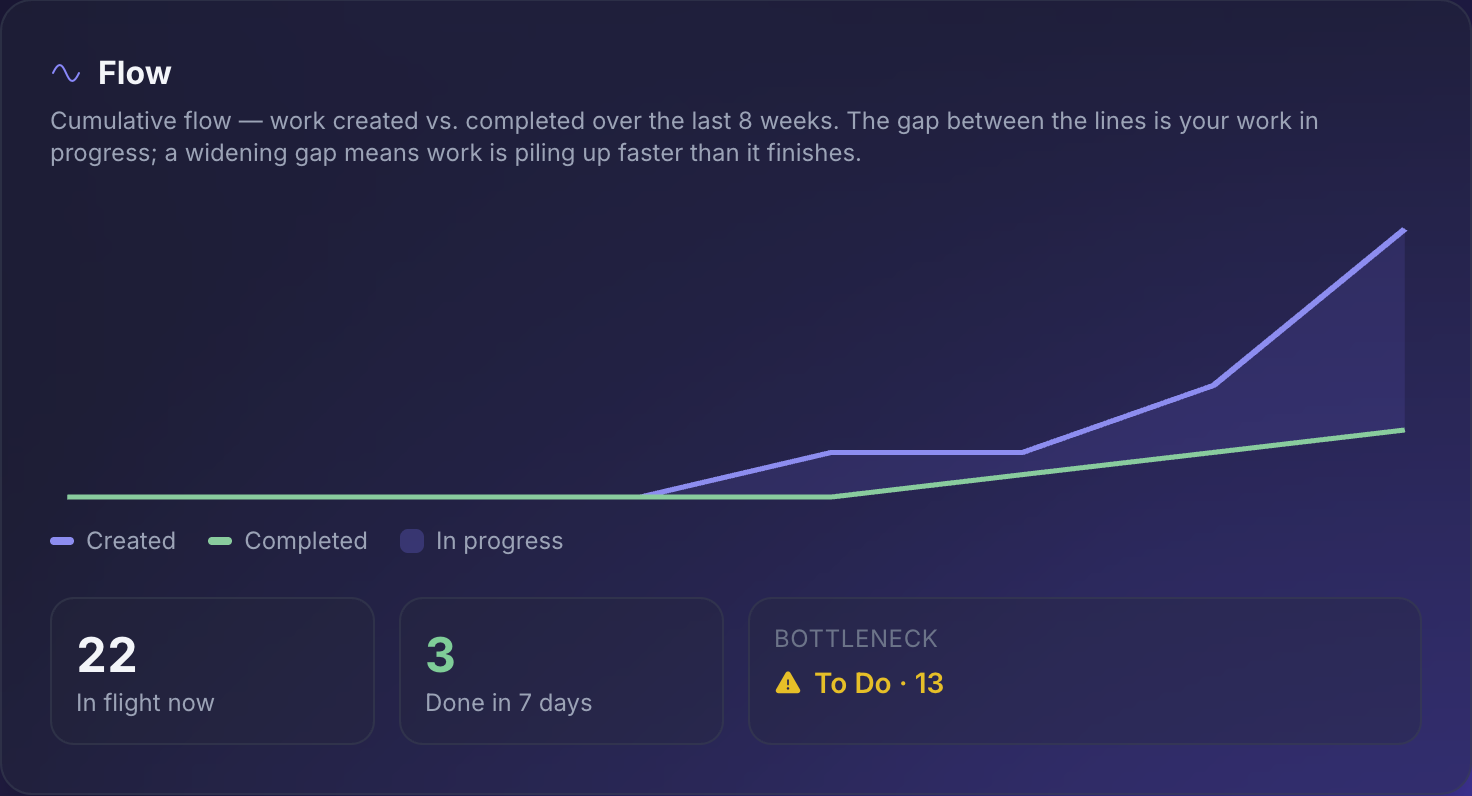
Diluta — Flow, a cumulative flow diagram of work created vs. completed

Flow

Work coming in versus going out. When the gap widens, you see the pile-up before you feel it.

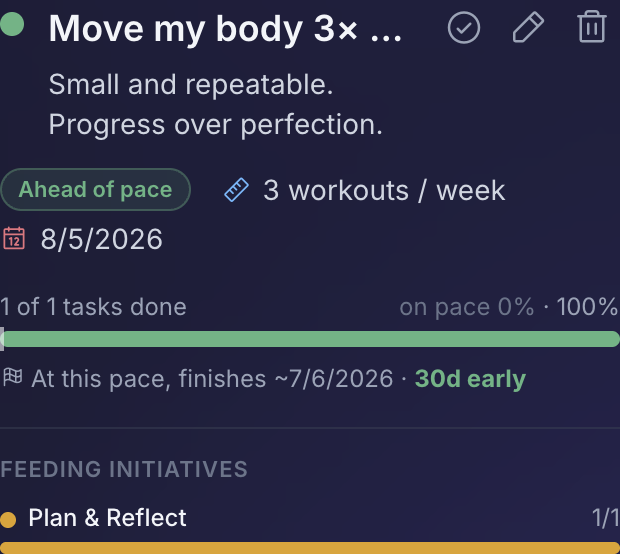
Diluta — Strategic Rollup with goal pace and projected finish

Strategic Rollup

Each goal with its true pace and a projected finish — so "a little behind" shows up while there's still time to act.

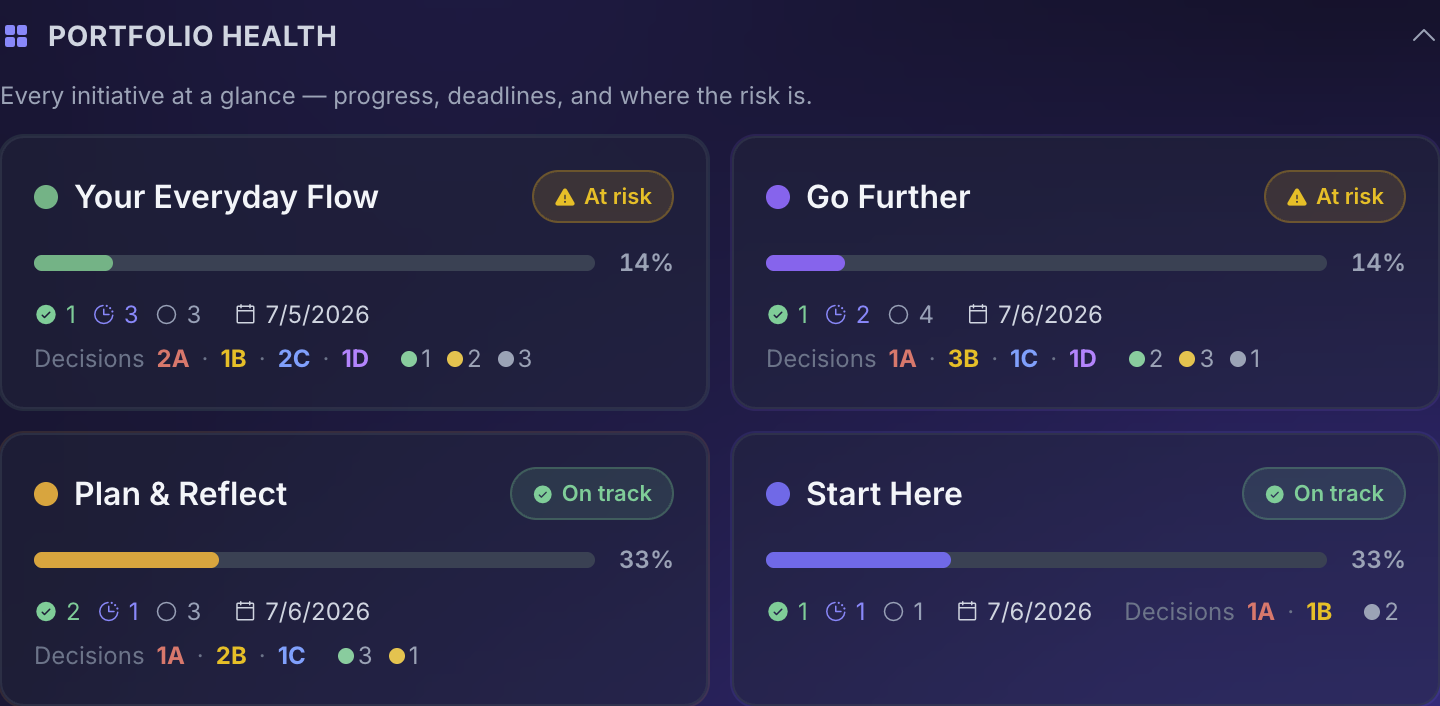
Diluta — Portfolio Health across your initiatives

Portfolio Health

Every project as a single line — progress, next deadline, and where the risk is. "How's it all really going?" answered in one glance.

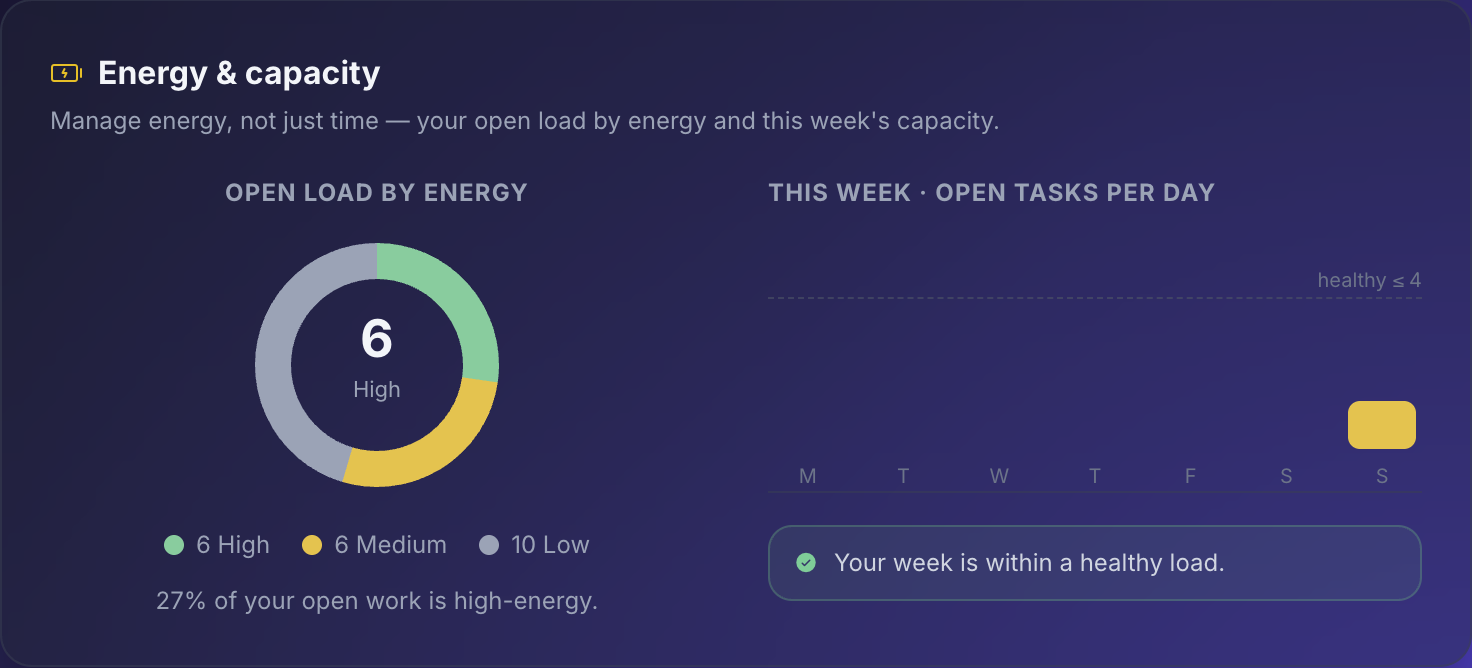
Diluta — Energy & Capacity, open load by energy and this week's capacity

Energy & Capacity

Your week's load by energy, with a gentle nudge when a day is asking too much. Move one thing, breathe easier.

You never build a report. You just open the app — and the week has already made sense of itself.

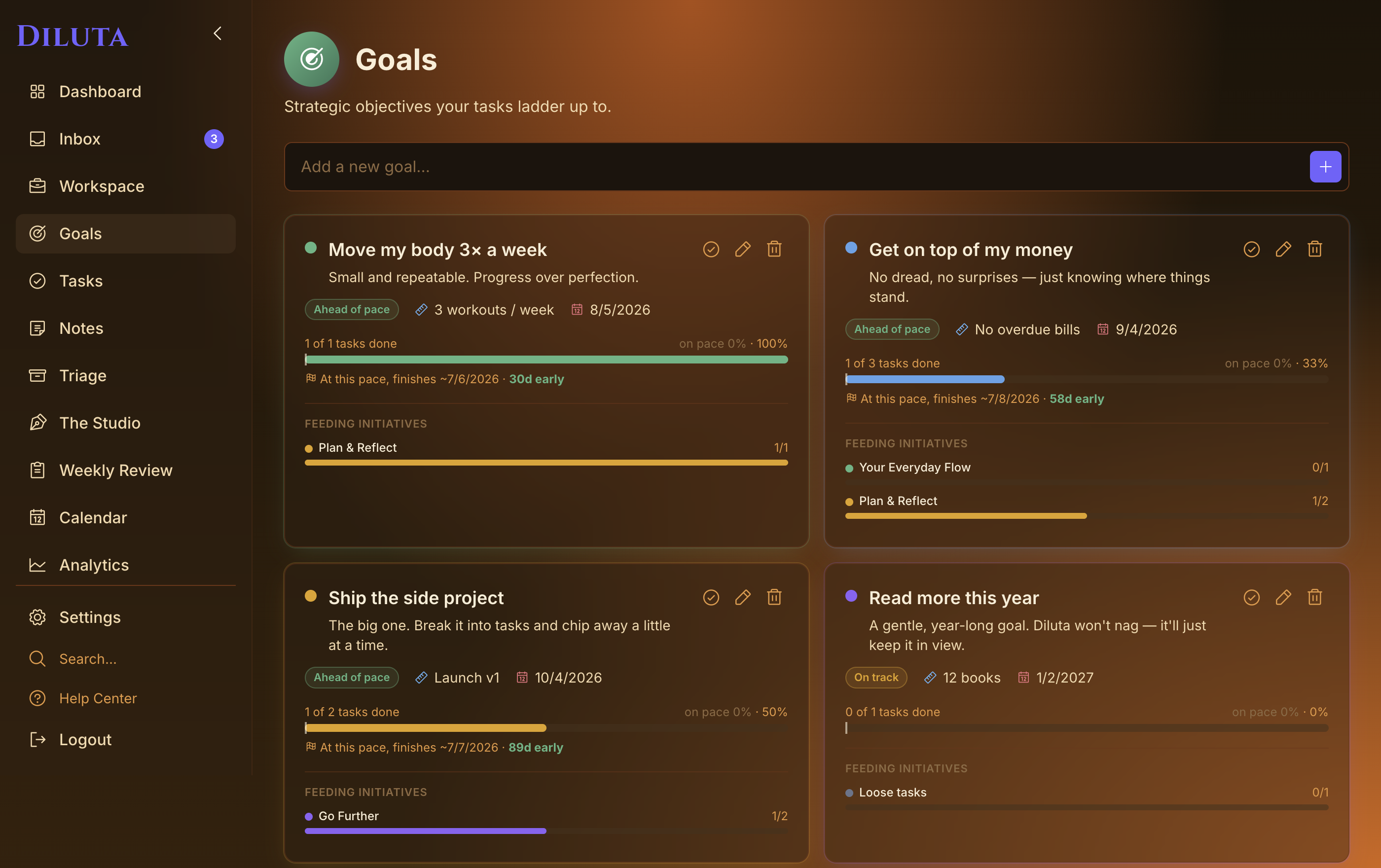
Goals

The rare to-do list that ladders up to where you're going.

Set a real goal — "Ship the side project," "Move my body 3× a week," "Read more this year" — and tie today's tasks to it. Diluta won't nag or shame you. It just keeps the destination quietly in view, so the small stuff adds up to something.

  • Give a goal a target, a metric, and a date
  • Watch progress fill as tied tasks get done
  • See your true pace and a projected finish — often sooner than you'd guess
Diluta — Goals
Diluta Goals — objectives your tasks ladder up to
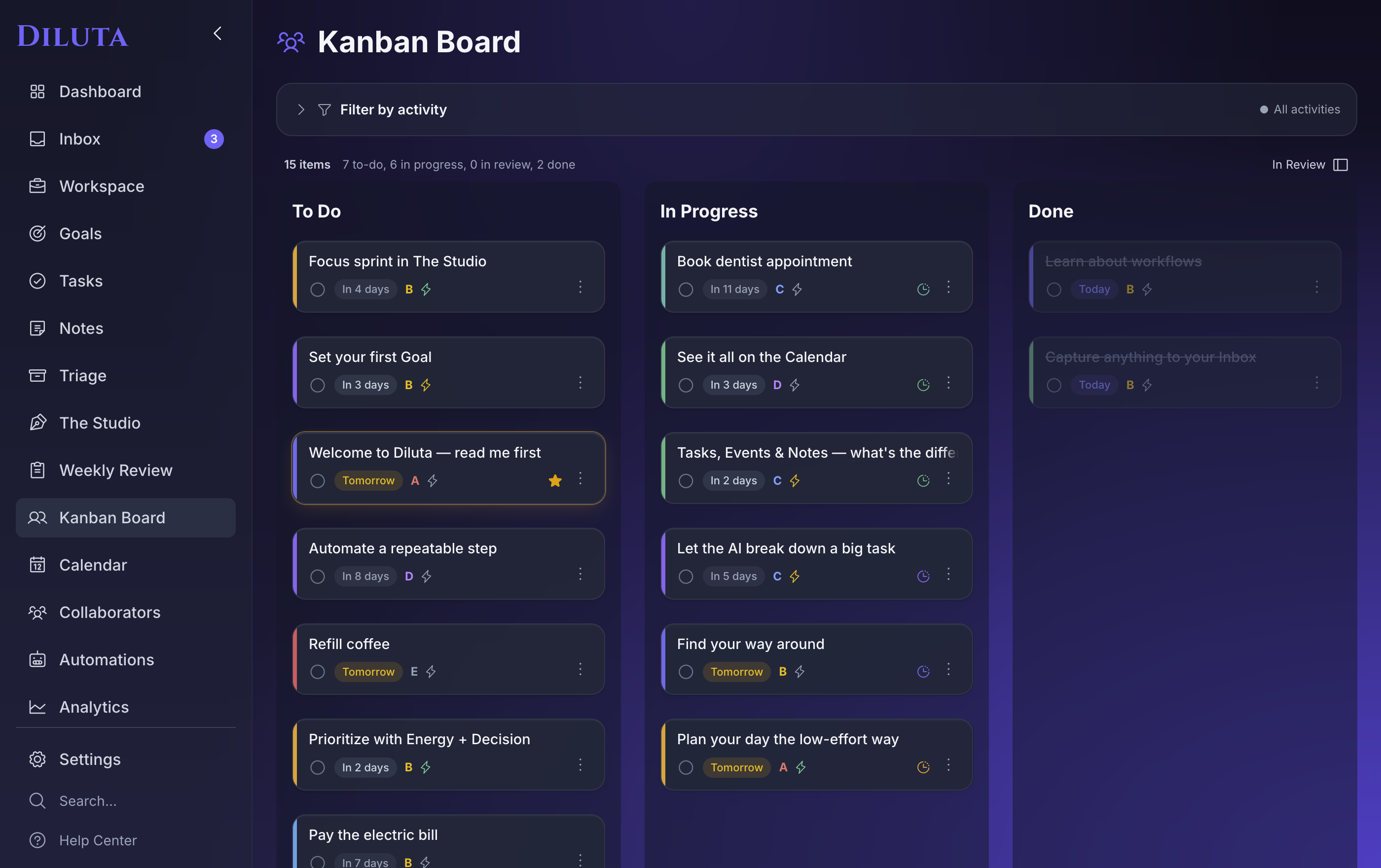
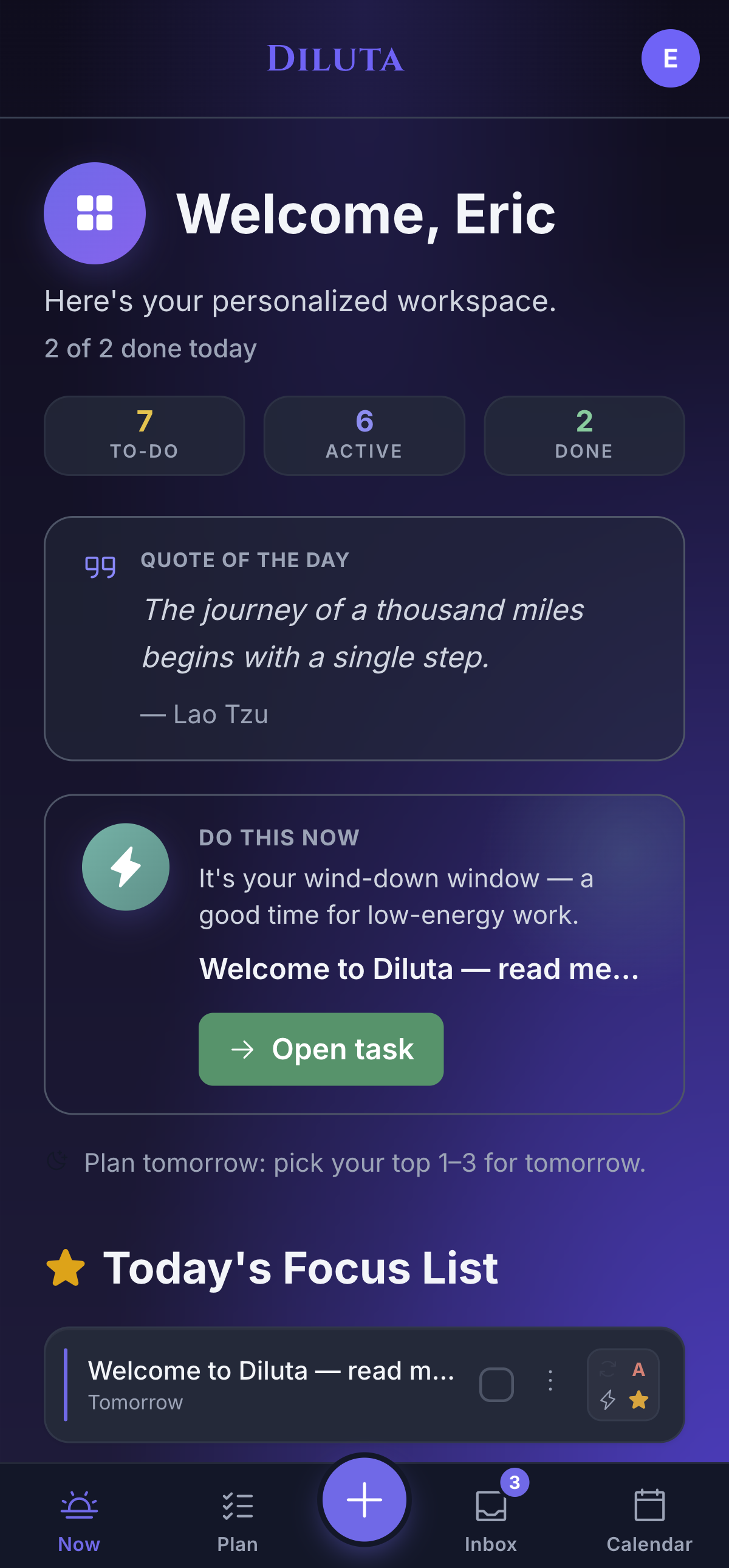
Now & Views

Open the app and the day's already framed.

Now is a calm briefing, not a backlog — the three numbers that matter, an energy-aware "do this now," and today's focus. And the same tasks show up however your brain needs them: a list to grind, a board to push work across stages, a calendar to plan. One source of truth underneath.

Diluta — Board
Diluta Kanban board
Diluta Now view on iPhone
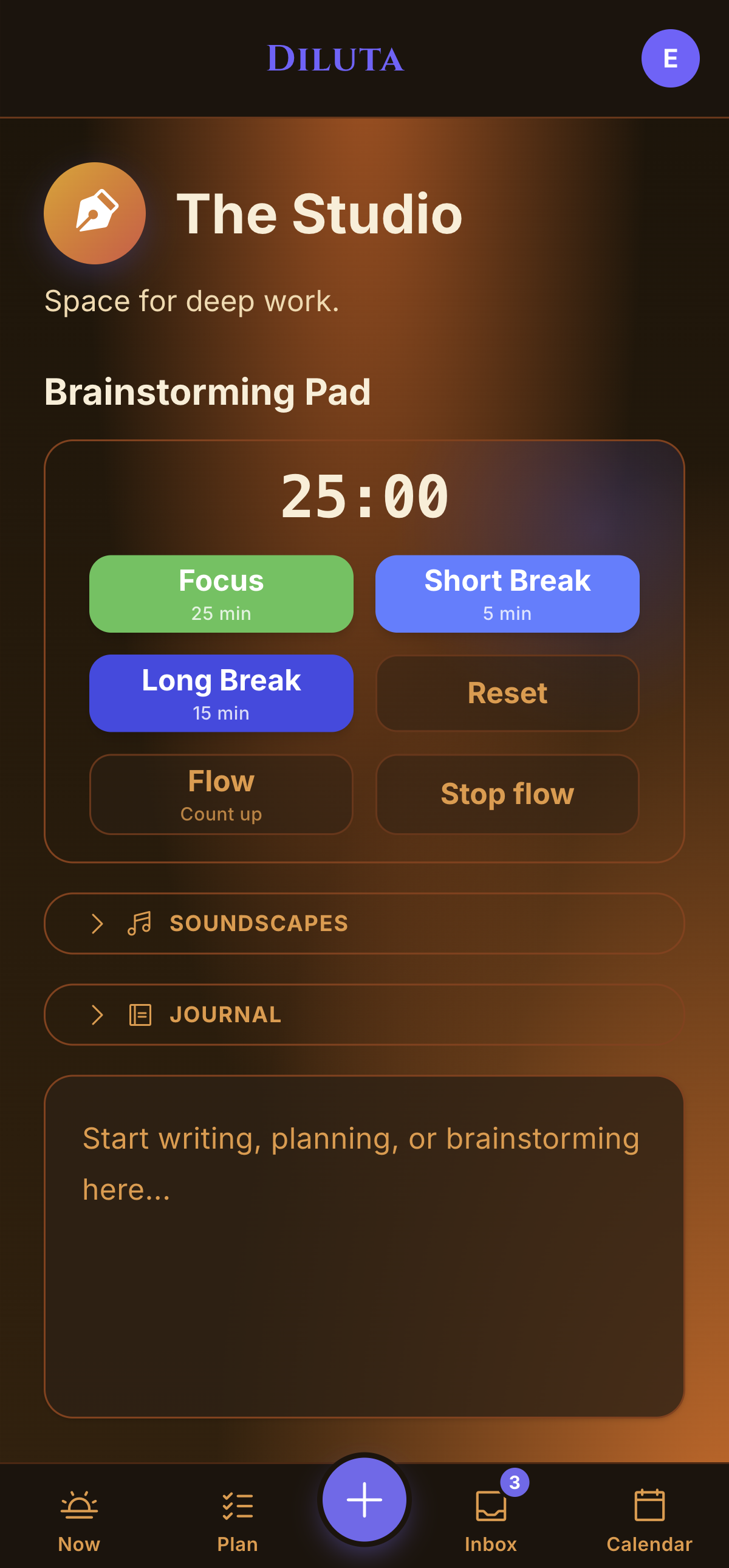
The Studio

A quiet room for the work that needs your head.

When it's time to actually do the thing, the Studio hands you a Pomodoro timer, ambient sound, and a notepad for the ideas that show up uninvited. Pick a task, start the clock, let the rest fade out.

  • Focus / short break / long break, or a free-running flow timer
  • A brainstorming pad that autosaves — capture and keep moving
Diluta — The Studio focus zone
Make the list yours

One list. Three ways to feel about it.

Some days you want every detail at a glance. Some days you want nothing but the next line. Pick the density that fits your brain — and switch anytime.

Minimalist layout
Minimalist

Just the next line

One clean row per task. Nothing but what's due and what's next.

Essentialism layout
Essentialism

Calm, at a glance

A quiet card with the signals that matter — priority, energy, focus — and nothing that doesn't.

Maximalist layout
Maximalist

Everything, up front

Dates, decision, energy, RICE and goals — all of it, right on the card.

And everything else

Depth when you want it. Out of the way when you don't.

No wiring anything up. No personality quiz. The whole toolkit is there the moment you need it.

Make it yours

Seven-plus themes, task colours, focus-pins, and the three list layouts. It should feel like your space.

Reminders & recurring

Daily, weekly, monthly, or weekday repeats, with reminders that fire at the right moment — even when the app is closed.

Share the load

Hand a task to your partner or a teammate and watch it update live. Built for households and small teams.

Automations

Simple rules like "when it's done, archive it." The repetitive housekeeping just happens in the background.

Analytics & Review

Completion trends and a weekly review turn a blurry week into something you can actually read.

Notes & Templates

Reference notes with no due date, plus templates for trips, projects, and routines you run again and again.

Apple, natively

Siri & Shortcuts, a Share Extension, home-screen widgets, and Apple Calendar sync across iPhone, iPad & Mac.

AI assistant

Plan an afternoon, break a big task into steps, or capture a thought — with full context, because it already sees your tasks.

After trying countless productivity apps — from complex project managers to simple to-do lists — I realised they all forced me into a box. So I set out to build one that adapts to you. I hope it helps you find your flow.
Diluta
Eric Saint-MarcFounder, Diluta · ThinkAhead Corp.
Working from a mountain top, week under control
Wherever Tuesday finds you

Your plan can fall apart.
You'll be fine.

You don't need a new productivity system. You need one that survives Tuesday. Free to try — premium unlocks the full toolkit when you're ready.

iPhone · iPad · Mac · Android  ·  See plans & pricing